
Arrivals, customer decisions, estimates and collections stay visible.
CERSUS Workshop
Run today's workshop from one clear view.
A diary, work-order and technician-control system for independent garages and dealership aftersales teams.
CERSUS Workshop is being developed so information is entered once and moves safely from booking and check-in to technician, Parts, approval, quality control and collection.
In development. £199 per month, per dealership/site, including Parts. A separate Parts subscription is not required with Workshop.
Initial setup: £250. Multiple products or sites: setup price TBA. No VAT is currently charged. Talk to Kevin about availability and setup.
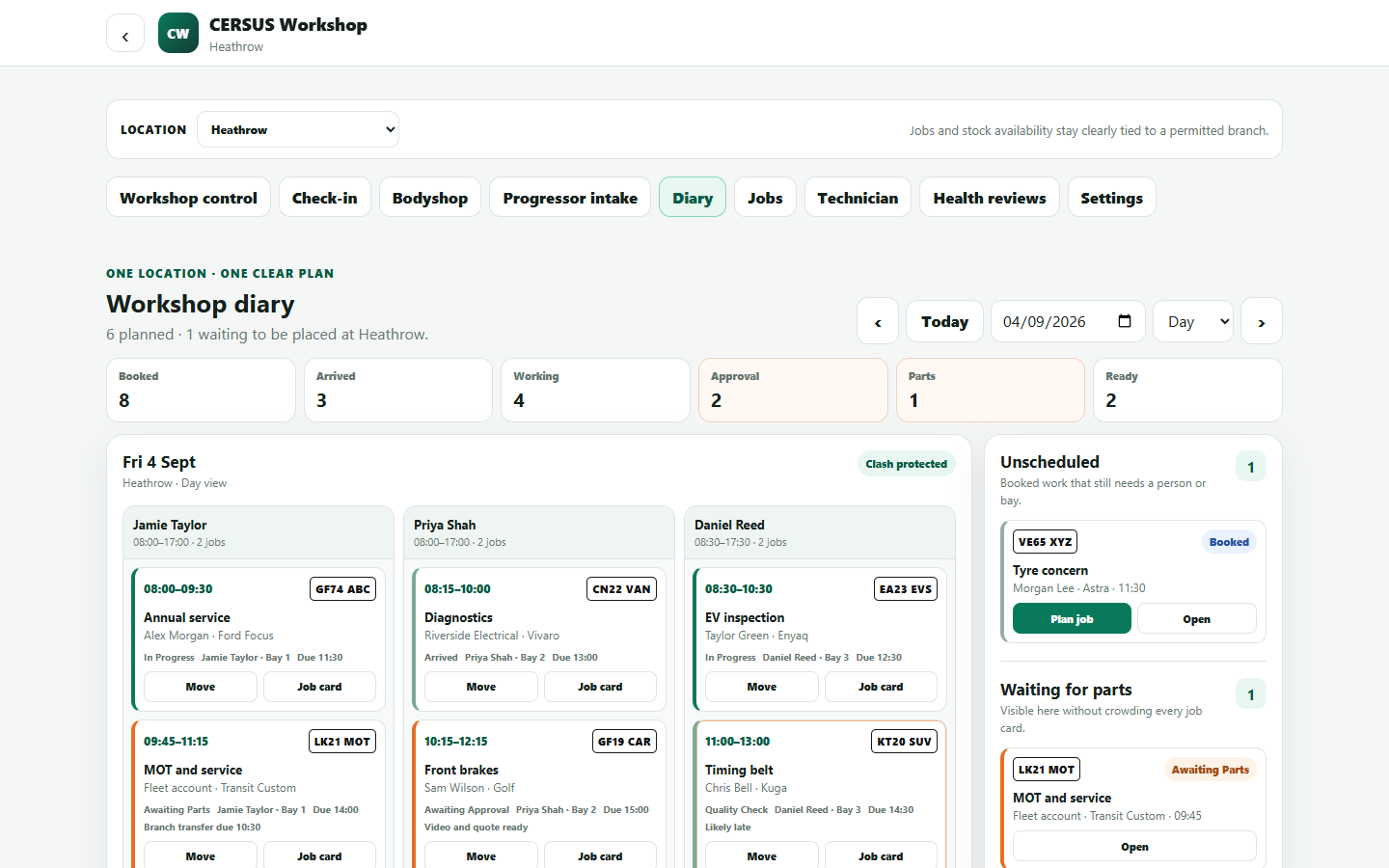
The one-look diary
See the working day—and the hours available to sell.
The diary is where a workshop makes its money. CERSUS is designed to show booked hours, technician capacity, gaps, overruns, blockers and work waiting to be placed, helping the controller maximise productive hours without overbooking the team.
See assigned work and the next clear action without a crowded screen.
See requests, availability, transfers and issue actions with the job.
See sold time against available hours, then spot unused capacity, late work, approvals and parts delays early.
Workshop journey
One job from booking to collection.
Customer, vehicle, branch, job and work lines keep the same identity as the vehicle moves through the day.
- 01Booking
Record the reason for the visit, preferred time and branch.
- 02Check-in
Confirm the vehicle, mileage, keys, agreed work and condition evidence.
- 03Technician
Start planned work, record time and complete the health check.
- 04Approval and Parts
Price additional work, capture the decision and fulfil parts safely.
- 05Quality control
Check that work, evidence and required controls are complete.
- 06Collection
Prepare the invoice-ready handoff and mark the vehicle ready for the customer.
Health check and evidence
Show what was found, what it means and what happens next.
A technician can record a Green, Amber or Red condition, measurements, an explanation, photographs or a clear walk-around video, proposed work, labour time and any Parts requirement.
Let the customer see the problem clearly.
The technician can record a short guided walk-around, pointing out tyre, brake, body or other concerns in plain language. The video stays with the finding so the adviser can send evidence, explain the recommendation and build confidence in the work being proposed.
Additional work cannot skip the decision.
Technician findings can become priced work, but they remain separate until the right internal or customer approval is recorded.
Know whether the job can move.
Availability, reservation, ordering, transfer and issue are visible without treating a request as stock already used.
Labour times and estimating
Discuss labour-time support for your workshop
Talk to Kevin about using Autodata for labour times and estimating. Connection availability, setup, any required supplier agreement and additional costs are agreed before work starts. The adviser remains in control of the time used, selling rate and final price.
Start from a recognised repair time instead of searching elsewhere and re-keying it.
Use the expected hours to place work against real technician capacity.
Keep local labour rates, adjustments and the customer quotation under workshop control.
Autodata is a requirement to discuss for your setup; it is not automatically included with the Workshop subscription.
Customer and vehicle check-in
Start with the right vehicle, the agreed work and a clear condition record.
A short guided check-in can capture mileage, fuel or charge level, keys, material items, condition photographs, existing damage and the customer's acknowledgement before the job begins.
- 01Confirm
Branch, customer, vehicle and booked reason.
- 02Record
Mileage, items left and vehicle condition.
- 03Agree
The booked work and any extra concern to investigate.
- 04Arrive
Save the timestamped check-in and move the job into today's workshop.
Across one site or several
Keep branch, bays, technicians and physical stock clear.
Each job belongs to a branch. Group views are deliberately labelled, while staff access, diary resources and stock remain limited to the locations each person is allowed to work with.
For integrated dealerships
Connections for your workshop
Talk to Kevin about connections with CERSUS DMS, Progressor and Parts. We agree which information needs to move between products, what is available and any additional work or costs before setup begins.
For independent garages
The same clear workshop core.
The product is also being shaped for garages that need the diary, job, technician and customer flow without licensing a full dealer-management system.
Start the conversation
What would your team need to see on today's workshop screen?
Talk to Kevin about your diary, check-in, technician, approval, Parts and collection flow, and where the day currently becomes hard to follow.
Talk to Kevin