
Keep days-to-retail in view
Seeing unfinished preparation work can help teams address avoidable delays before a vehicle is ready to advertise.
Used vehicle preparation
Used car preparation, visible from arrival to retail ready.
Progressor gives the team one clear view of where each vehicle is, what needs doing and who is dealing with it. Sales, prep and managers can work from the same position without another spreadsheet doing the rounds.
£199 per month, per dealership/site. Initial setup: £250. Multiple products or sites: setup price TBA. No VAT is currently charged.
Progressor in use
Progressor is designed to help dealers reduce avoidable preparation delays by making outstanding work and departmental progress easier to see. A shared view can support better control of days-to-retail and help managers decide what needs attention next.
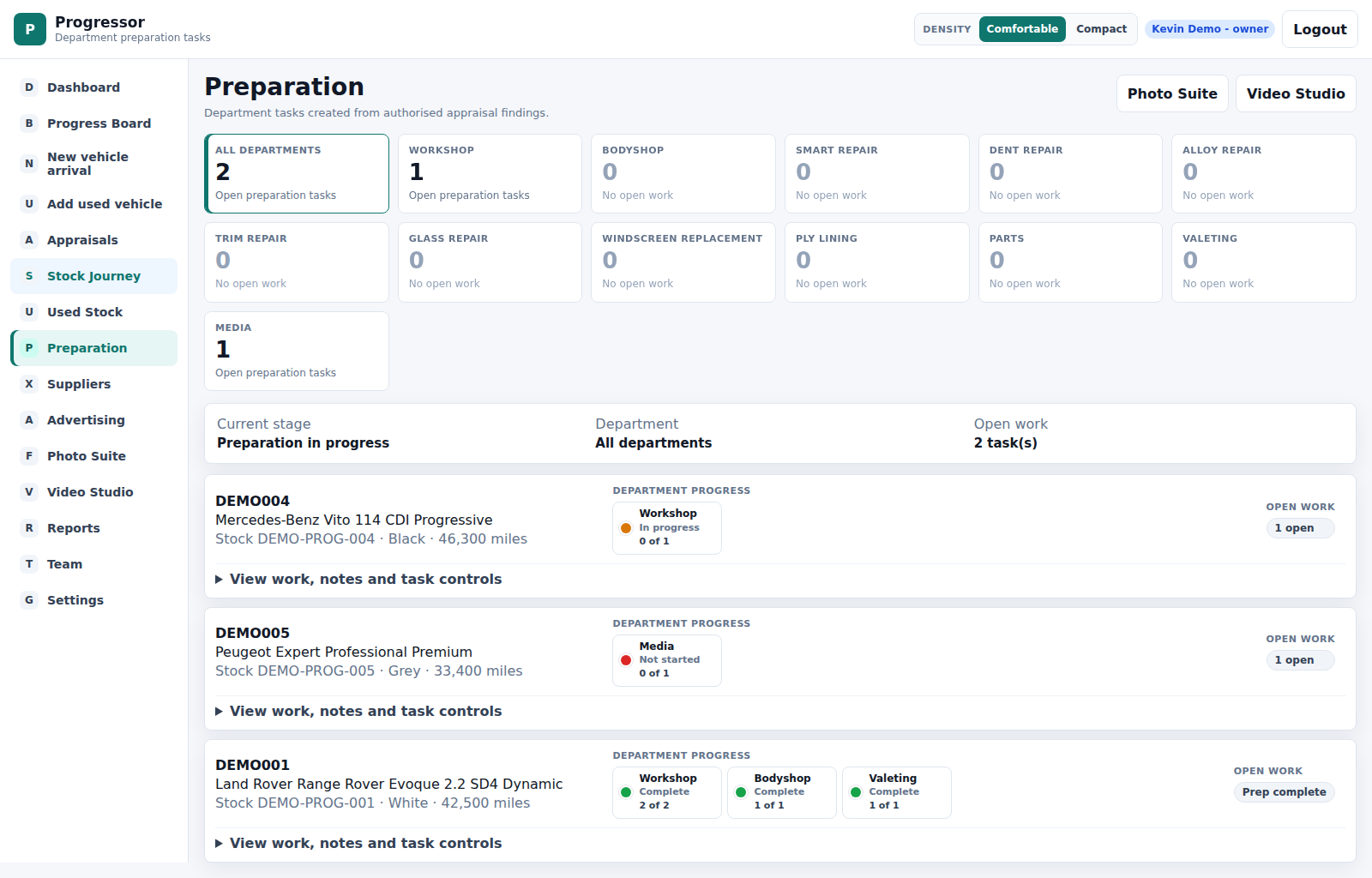
Seeing unfinished preparation work can help teams address avoidable delays before a vehicle is ready to advertise.
Department and vehicle views help teams see which jobs need attention and where to follow up.
Bring workshop, bodyshop, valeting and photography preparation into the same conversation.
Keeping findings, preparation items and approval notes together can support more complete cost checks and reduce the risk of work being overlooked.
A shared record helps the next person understand what remains to be done, reducing the risk of a car being forgotten between departments.
Sales managers and dealer principals can review the position and focus their follow-up where it is needed.
The normal prep day
Cars arrive and need checking. One might need mechanical work, another needs the bodyshop, and another is waiting for valeting or photos. None of that is unusual. The difficult bit is keeping the current position clear while everybody gets on with their job.
How Progressor helps
Progressor follows the vehicle through the jobs that make it ready for sale, keeping the current stage, work and evidence visible to the people who need it.
Record the car, complete the first checks and make the starting position clear.
Turn findings into practical jobs and keep required work moving.
See outsourced jobs, ownership and updates alongside the vehicle.
Keep media work visible before the car is presented online.
Finish with a shared view that the vehicle is prepared and ready to advertise.
Scan the position, spot hold-ups and open the detail that needs attention.
Progressor helps everyone stay on the same page. Sales, prep, workshop, bodyshop, suppliers and management can all see where the vehicle is, what still needs doing and who is dealing with it. That can help keep the flow moving and reduce the need to chase people for updates.
Progressor supports the appraisal process by helping the team record what needs doing and what needs authorising. It can help flag practical items such as keys, MOT dates, service history, preparation items and work that needs sorting, so they do not get missed in a busy department. That can support better control and help vehicles move through preparation.
The Progress Board
Move vehicles through the working stages as preparation progresses. The board shows what is where, what needs attention and the latest useful position without asking every department for another update.
Keep arrivals, workshop jobs, bodyshop work, media and retail-ready stock in one view.
Drag a vehicle to the next sensible stage and leave a clear status note.
Sales, preparation and managers all see the latest position.
Appraisal and evidence
An appraisal should lead to a clear preparation plan. Progressor keeps findings, photo evidence, approval notes and preparation items connected to the vehicle, so the next person can understand what was found and what has been agreed.
Record the condition and the practical work that follows from it.
Keep useful images alongside the vehicle record and preparation history.
Make the decision and instruction clear before work starts.
Give each job a visible place in the route to retail ready.
Keep outside work and evidence in the same vehicle story.
Bodyshop and supplier work
Outside work is part of normal preparation. Progressor helps the dealership authorise the job, track who has it and keep the update or evidence with the vehicle.
Manager control
Managers can scan current stock preparation, see where work is slowing down and check whether the vehicle has reached retail ready. When something needs a closer look, the history and evidence are there to open.
Who Progressor is for
Keep preparation visible as stock moves through a busy site.
Bring the different parts of used vehicle preparation into one view.
See what can be advertised and what still needs attention.
Work from clear jobs, notes and evidence attached to the vehicle.
Get better visibility without introducing a complicated system.
Progressor questions
It helps dealerships organise the work between a vehicle arriving and becoming retail ready. Progressor brings preparation stages, jobs, notes and evidence together around the vehicle.
Progressor is designed to help teams identify outstanding work and avoidable delays earlier. That can support a shorter preparation journey, but results depend on the vehicle, parts availability, supplier capacity and how consistently the team updates its work.
Progressor's preparation views help teams see work across these departments, including outstanding tasks and progress against individual vehicles.
Keeping the vehicle's stage, outstanding work and notes visible gives the next department a clearer handover. Managers can review what still needs attention instead of relying entirely on separate conversations.
Recording preparation items and approval notes gives the team a clearer basis for checking that required work has been considered when reviewing costs. It supports the checking process; it does not guarantee that every cost will be captured.
It provides a shared view of vehicle preparation, helping managers identify hold-ups, check readiness and focus their follow-up.
Talk to Kevin about your current preparation process and where updates or handovers get missed. He can discuss how Progressor could fit your operation.
Start the conversation
Talk to Kevin about how your vehicles move from arrival to retail ready. We will agree the requirements, setup and costs before configuring Progressor for your business.
Talk to Kevin